Security & Ops
Two-Factor for WordPress Admins Without Locking Yourself Out
WordPress administrator accounts cannot rely on a single defensive boundary when authentication spans both browser sessions and machine-to-machine interfaces.
Last reviewed
Hardening an administrative profile with two-factor protection stops credential stuffing at the login form. Yet it introduces a sharp operational hazard: an administrator who misplaces an authenticator risks being permanently locked out of the site.

Managing this risk requires separating interactive user sessions from programmatic access paths. A secure setup demands an exact understanding of how browser logins, background application passwords, and recovery mechanisms interact under WordPress core architecture.
Interactive Browser Sessions Versus Programmatic API Endpoints
A standard administrative login relies on the browser interface at wp-login.php. When configuring wordpress two factor authentication admin workflows, administrators often assume a single token will govern every inbound request. WordPress splits authentication across distinct functional boundaries.
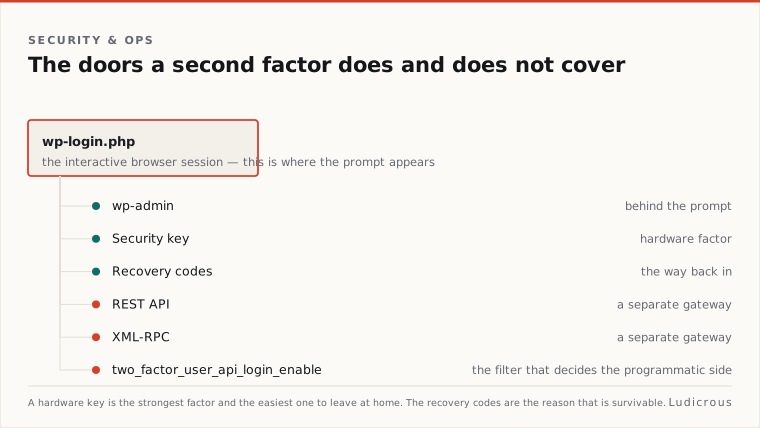
Interactive logins require human presence, entering a username, password, and a second verification step. Programmatic interfaces operate on entirely different rules. WordPress introduced Application Passwords directly into core, providing revocable, per-application credentials for background tools and external integrations.
The documentation states, these credentials generate a unique string tied directly to a single user profile. The system displays this generated string once; if the administrator does not copy or store it immediately, it cannot be retrieved from the database.
Application passwords are built specifically for API authentication, covering the WordPress REST API and XML-RPC where that interface remains enabled. The documentation confirms they do not function for interactive browser logins. An automated script or publishing tool cannot use an application password to open a dashboard session in a web browser. Conversely, an interactive second-factor prompt will not intercept a REST API request passing valid application credentials. Treating these two channels as identical creates blind spots in an access policy.
The Ten-Code Recovery Surface and Lockout Safeguards
A second factor creates an absolute barrier if the primary device fails. When an administrative phone is wiped, lost, or broken, the standard authentication challenge cannot complete. Without a predefined recovery mechanism, the site administrator faces complete administrative lockout.
WordPress.org details the standard backup mechanism for two-factor setups. When configuring authentication on WordPress.org profiles, the system generates exactly ten single-use backup codes. The interface provides options to print, copy, or save these strings to an external storage medium.
During an active lockout, an administrator visits the standard login screen, enters their username and primary password, and reaches the secondary prompt. The interface includes an actionable link: "Use a recovery code". Submitting one valid code satisfies the second-factor requirement, invalidates that single code in the database, and grants full access to the administration panels.
The primary risk in this recovery chain is storage location. If an administrator leaves the ten backup codes on the same physical mobile device that runs their authenticator, any loss of that device destroys both authentication channels simultaneously. Operational safety requires holding recovery codes in a physically separated vault or printed offline ledger. Ten codes provide ten distinct recovery opportunities before an administrator must generate a replacement set inside wp-admin.
Controlling REST API and XML-RPC Gateways
Hardening interactive logins leaves secondary attack surfaces untouched if programmatic gateways accept legacy credentials. WordPress specifies that Application Passwords transmit credentials over HTTPS using HTTP Basic Authentication, adhering to the RFC 7617 standard.
Because application passwords bypass interactive two-factor prompts, background endpoints can become an administrative back door if left unmanaged. WordPress confirms that since WordPress 5.6, application passwords authenticate against both the REST API and XML-RPC endpoints. This architectural behavior allows automated clients to execute authorized commands under an administrator's user role without confronting an interactive second-factor challenge.
// Enforce application passwords for programmatic endpoints
Add_filter( 'two_factor_user_api_login_enable', '__return_false' );
The Two Factor plugin identifies an explicit control hook: the two_factor_user_api_login_enable filter. When implemented, this hook restricts REST API and XML-RPC authentication strictly to application passwords, blocking any attempt to authenticate programmatic endpoints with standard user passwords.
Restricting API authentication prevents credential reuse. An attacker possessing an administrator's primary password cannot pivot to the REST API or XML-RPC to run administrative actions, because the site refuses raw passwords over API channels. Each background integration must carry its own isolated, revocable application string.
Security Keys and Hardware Factor Configurations
Physical authentication hardware offers an alternative to code-based verification. WordPress.org explicitly references support for a "Two-Factor Security Key" when configuring account protection.
Hardware tokens remove the manual data-entry step required by software authenticators. Instead of reading a rolling code from a phone display, the administrator inserts or taps a physical hardware key during the login sequence. This binding ties the verification exchange directly to the cryptographic challenge issued by the browser.
Hardware keys do not alter the underlying necessity for recovery codes. If an administrator depends entirely on a single physical key, misplacing that key produces the exact same failure state as losing a mobile phone. The ten generated backup codes remain the verified recovery path documented by WordPress.org to regain dashboard entry.
Using hardware security keys alongside application passwords establishes distinct security perimeters: - Interactive dashboard logins require the primary password plus the physical security key. - Emergency recovery relies strictly on the ten single-use backup codes. - REST API connections use unique, per-application passwords over RFC 7617 HTTPS Basic Auth. - XML-RPC requests remain restricted to designated application credentials or disabled entirely.
Unverified Recovery Boundaries in WordPress Operations
While the core mechanics of Application Passwords and backup codes are documented across official WordPress portals, the official published record leaves several operational boundaries undefined.
WordPress documentation does not provide a core-level command-line procedure for disabling two-factor authentication on a specific user profile during an active lockout. While server operators frequently access sites via shell interfaces, WordPress core documentation does not establish a standardized WP-CLI command sequence for emergency two-factor removal within its primary manuals.
The core documentation also omits formal references to secondary administrative fallback accounts as an official recovery standard. While system administrators often maintain a dormant, secondary administrator profile to unlock primary users, official guides focus strictly on the ten backup codes generated at setup.
Official sources do not publish comparative cryptographic assessments contrasting email-based codes against hardware tokens, nor does the WordPress core handbook establish native support for SMS-based verification codes. The verified operational architecture documented by WordPress rests strictly on interactive factors, hardware security keys, ten backup codes, and RFC 7617 application passwords. Managing those specific surfaces prevents lockouts without compromising administrative authority.