 Tooling
Tooling
Bookmarklets Still Work, and They Are Still Worth Writing
A javascript: URL executes code directly inside the context of the active web page.
Last reviewed
This single characteristic makes bookmarklets functional without requiring an installed browser extension, granting scripts immediate access to the DOM tree and browser environment.
Yet developers running old snippets or assembling new utilities frequently watch their scripts fail. The breakdown almost always traces back to two specific technical friction points: unchecked return values that overwrite the document, and modern security policies blocking inline script execution. Understanding how to write a bookmarklet today requires managing how browsers parse the javascript: pseudo-protocol, how strings resolve, and how host sites restrict execution.
DOM Access and the Mechanics of javascript: Execution
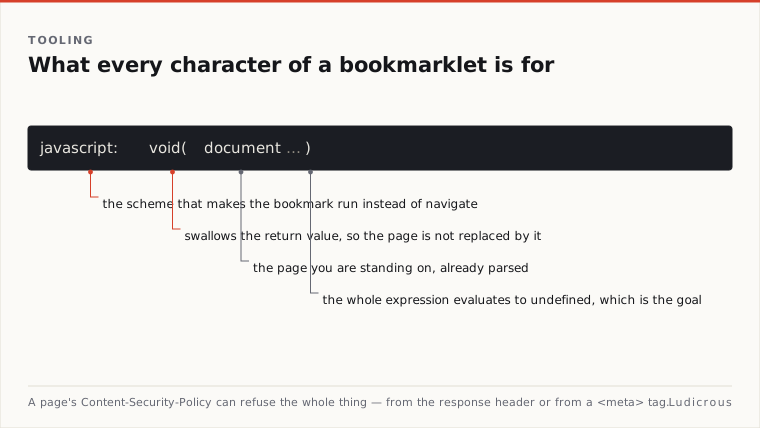
A bookmarklet is simply a uniform resource identifier using the javascript: scheme stored inside a browser bookmark entry. When a user activates the bookmark, the browser evaluates the payload against the active page rather than navigating to a remote host.
Because the code executes in the page context, native variables and object trees belong to the host. As technical notes outline, standard DOM references such as document point straight to the active document instance. If a script searches for an element, checks an attribute, or reads selected text, it interacts with the live document loaded in the active tab.
Script encapsulation prevents variable leakage. In one guide, developers are instructed to wrap bookmarklet code inside an Immediately Invoked Function Expression (IIFE) within the javascript: URL wrapper:
Javascript:(function{
 const title = document.title;
 console.log(title);
});
An IIFE isolates lexical scope. Without this enclosure, variables declared with var, let, or const can collide with scripts already running on the site, causing naming exceptions or silent execution failures.
Context sharing has limits. Bookmarklets possess no specialized browser extension permissions. They operate under the standard privileges of the page itself.
Preventing Accidental Page Replacement with the Void Operator
The most common failure mode when writing a bookmarklet is accidental page replacement. MDN Web Docs documents that when a javascript: URL resolves to a string value, the browser treats that string as new markup and replaces the current document with it.
If a bookmarklet ends with an expression that evaluates to text—such as an assignment, a method call returning a string, or an unassigned string variable—the entire page disappears. In its place, the browser displays a blank screen containing only the returned text.
Javascript:(function{
 return document.title = "Updated Title";
});
Executing that snippet does not merely change the title property. Because the assignment expression evaluates to the assigned string, the browser clears the DOM and writes the string directly to the viewport.
MDN Web Docs recommends prefixing javascript: URLs with the void operator whenever the script might otherwise evaluate to a string. The void operator evaluates an expression and returns undefined. Because undefined is not a string, the browser performs no navigation, leaving the DOM untouched.
One guide details two implementations for DOM-mutating scripts: 1. Appending void 0; or void 0 to the very end of the script block. 2. Wrapping the outer execution entirely inside void(...).
Javascript:void((function{
 document.title = "Updated Title";
}));
Both patterns enforce an undefined resolution. The script executes its mutations, touches the DOM, and terminates quietly without triggering browser replacement.
Percent-Encoding and Handling Dynamic String Values
URLs enforce structural syntax. Characters that carry reserved operational meanings in a URI cannot always sit raw inside a bookmark's address field.
Percent-encoding provides the mechanism for encoding characters with special meaning in URLs, as documented by MDN Web Docs. The process substitutes an invalid or reserved character with a % symbol followed by the two-digit hexadecimal representation of the character's ASCII value. A literal space becomes %20, while control symbols and quotation marks receive their respective hexadecimal equivalents.
Raw source code pasted into a browser address bar or stored within bookmark properties often breaks if reserved characters interrupt the URL parser. While modern browsers automatically encode certain characters when saving bookmarks, explicit percent-encoding ensures the script payload remains intact across different browser bookmark managers.
Dynamic data extracted from the page requires runtime encoding as well. In the bookmarklet implementation provided in technical notes, dynamic queries built from highlighted text explicitly use encodeURIComponent:
Javascript:void((function{
 const q = window.getSelection.toString;
 if (q) {
 window.open('https://example.com/search?q=' + encodeURIComponent(q));
 }
}));
Without encodeURIComponent(q), query terms containing ampersands, question marks, or slashes corrupt the destination URL query string. The distinction matters: percent-encoding the bookmarklet itself protects the script code inside the browser bookmark database, whereas encodeURIComponent protects runtime parameters assembled by the script as it executes.
Content Security Policy Restrictions in Response Headers and Meta Tags
Even a syntactically correct, properly encoded bookmarklet wrapped in void will fail if the host site enforces a restrictive Content Security Policy (CSP).
A CSP defines the operational boundaries for scripts, styles, and external network requests on a page. MDN Web Docs states that a CSP should be delivered to the browser inside the Content-Security-Policy HTTP response header. Chrome for Developers documentation notes that servers can also deliver CSP rules via a <meta> element containing an http-equiv="Content-Security-Policy" attribute inside the page markup.
Some websites implement strict Content-Security-Policy headers that explicitly block javascript: URLs from executing. When a browser detects an incoming javascript: protocol evaluation on a page governed by a strict directive, the engine refuses to run the script and logs a violation to the console.
These security boundaries affect network calls as well. If a bookmarklet attempts to inject an external script tag or fetch data from an external origin, the host page's CSP can block the network request immediately. The bookmarklet cannot bypass the host site's security configuration because it runs inside that exact context.
To operate under restrictive environments, Creachadair's notes outline a workaround that routes data through a small local helper server. Instead of forcing the page to load unauthorized remote dependencies directly, the bookmarklet communicates with a local endpoint running on the user's machine.
When building tools today, checking the console for CSP errors is a required diagnostic step. If a target domain deploys a header blocking script execution entirely, the tool must move from a bookmarklet into an environment with distinct operational privileges.