 Tooling
Tooling
Choosing a Local WordPress Environment You Will Still Use in a Year
Local development runs directly on a workstation.
Last reviewed
According to documentation published by Pantheon in 2026, working locally gives engineers the fastest environment to write code, debug changes, experiment with architecture, and work offline without disrupting teammates or live site visitors.
Speed during initial setup often masks architectural divergence. A tool that spins up an instance in seconds can still introduce configuration drift that conceals operational defects until deployment. When evaluating a local WordPress development environment for long-term engineering work, the primary technical consideration is how faithfully the local environment reproduces the behavior of the destination server.
Structural Options Across Containers and Host Tools
Developer documentation outlines several distinct mechanisms for running WordPress on a local machine. Official npm documentation for the @wordpress/env package, in 2025, defines wp-env as a dedicated utility for building and testing plugins and themes. The package abstracts the underlying runtime into preconfigured containers, setting default MySQL credentials to user root with the password password.
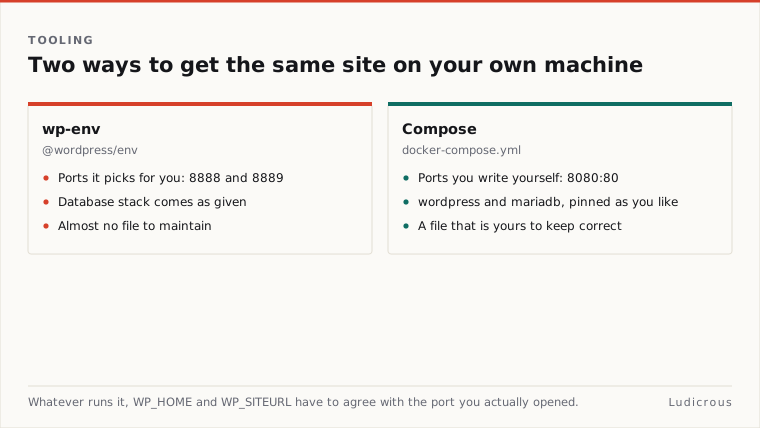
In 2024, the WordPress.com Blog documented an alternative containerized workflow based on a manual docker-compose.yml configuration. That setup explicitly defines two coordinated services: a wordpress application service and a mariadb database service.
While practitioners frequently divide tooling into container systems, all-in-one desktop stacks, and virtual machines, official WordPress documentation has not published a formal comparative study ranking those three approaches against one another. The published materials describe the mechanics of specific tools rather than declaring a single architectural standard. Teams selecting an approach must therefore evaluate the published parameters of each environment against their own deployment targets.
The package @wordpress/env isolates theme and plugin validation into lightweight routines. In contrast, custom Compose configurations give teams direct control over the service definitions in the Compose file. Neither documentation source, however, provides performance benchmarks across different host operating systems or measures host filesystem translation overhead.
Port Mappings, Hostnames, and URL Definitions
Routing traffic to a local WordPress instance requires explicit URL and port handling. In guidance titled "Running a Development Copy of WordPress," in 2023, WordPress Developer Resources recommends defining WP_HOME and WP_SITEURL directly from the current host. This configuration allows a local copy to function properly across host-based web addresses.
Different workflows handle port binding through distinct conventions:
wp-envlaunches the primary development site athttp://localhost:8888/and provisions a separate, isolated test site athttp://localhost:8889/.- The WordPress.com Compose guide maps the core WordPress container to port
8080:80, exposing the browser-accessible site atlocalhost:8080. - The same WordPress.com Docker walkthrough maps the phpMyAdmin database interface to port
8180:80.
Port allocation determines how services interact on the host. When local sites run on non-standard ports like 8080 or 8888, absolute asset paths and internal redirects must account for the port number within the stored site configuration. Using dynamic WP_HOME and WP_SITEURL definitions prevents hardcoded host values from breaking when switching between ports or migrating data back to remote infrastructure.
Beyond basic host-based URL declarations, the primary documentation does not specify formal standards for local HTTPS termination or local DNS routing. Developers must manage custom hostnames independently if their application code relies on top-level domain parity.
Database Stacks and Configuration Divergence
Database behavior represents a major source of discrepancy between local machines and production servers. The Docker setup published by WordPress.com relies on the mariadb:latest image tag for its database tier.
Using floating image tags like mariadb:latest pulls the most recent release whenever the container image updates. If production hosts operate on older versions or run MySQL instead of MariaDB, query optimization and internal storage mechanics may diverge. The @wordpress/env environment fixes its internal database access to standard default credentials (user root and password password), standardizing local access while diverging entirely from the hardened privilege models enforced on production servers.
+--------------------------+-----------------------+---------------------+
| Environment Workflow | Primary Access Point | Database Service |
+--------------------------+-----------------------+---------------------+
| @wordpress/env | localhost:8888 | MySQL (root/password)|
| @wordpress/env (Testing) | localhost:8889 | MySQL (root/password)|
| WordPress.com Compose | localhost:8080 | mariadb:latest |
| WordPress.com phpMyAdmin | localhost:8180 | Linked to MariaDB |
+--------------------------+-----------------------+---------------------+
Application code must also adhere to strict syntax rules across environments. WordPress Developer Resources coding standards, in 2019, instruct developers to keep SQL keywords capitalized within database queries, pointing specifically to commands such as UPDATE and WHERE.
The core documentation does not publish data on how differences in strict SQL modes affect query execution across database engines. Nor does it document the exact failure rates caused by case-sensitive versus case-insensitive table naming on different host filesystems. These gaps leave developers to manually verify database parity rather than relying on automatic stack alignment.
Workflow Realities and the Parity Gap
Pantheon notes that local systems provide an isolated perimeter where engineers can experiment freely without risking production uptime or interfering with team members. The tool @wordpress/env addresses this need for plugin and theme authors by providing immediate access to clean environments on ports 8888 and 8889.
Convenience during development does not equal identical execution during deployment. The available records from WordPress.org, WordPress.com, and npm do not verify that container stacks eliminate production-only regressions. Key operational variables remain absent from the official literature:
- The impact of differing PHP extension configurations between local containers and remote hosts.
- Documented discrepancies in how local runtimes handle background mail routing compared to live server daemons.
- Reproducibility guarantees across secondary developer workstations running different host operating systems.
Building a durable local WordPress development environment requires separating documented tool capabilities from unverified assumptions. The published specifications confirm that container-based Compose files and @wordpress/env scripts deliver fast, scriptable, and isolated execution on local ports. Whether those local environments successfully expose every production defect remains an open question that current documentation leaves unanswered.