 Engineering
Engineering
REST API or admin-ajax: Choosing the Right Endpoint
Omitting a permission_callback from register_rest_route has broken custom endpoint registrations since WordPress 5.5.0 treats missing authorization checks as an error.
Last reviewed
That hard requirement highlights the architectural divide between modern REST endpoints and legacy request handling. Front-end requests that query or modify resources belong on the REST infrastructure, where routing, parameter parsing, and access control operate as distinct execution stages authenticated through the wp_rest nonce action.
The choice between a REST endpoint and admin-ajax.php is an architectural division between structured resource modeling and procedural script dispatch. While older implementations funnelled asynchronous front-end requests through the administrative backend, modern application interfaces demand explicit contracts.
Separating Authorization from Execution on rest_api_init
Custom endpoints in the REST infrastructure register during the rest_api_init action hook. When WordPress processes a registered route, it splits the request lifecycle into two independent responsibilities: - Access evaluation through permission_callback - Data retrieval or persistence through callback
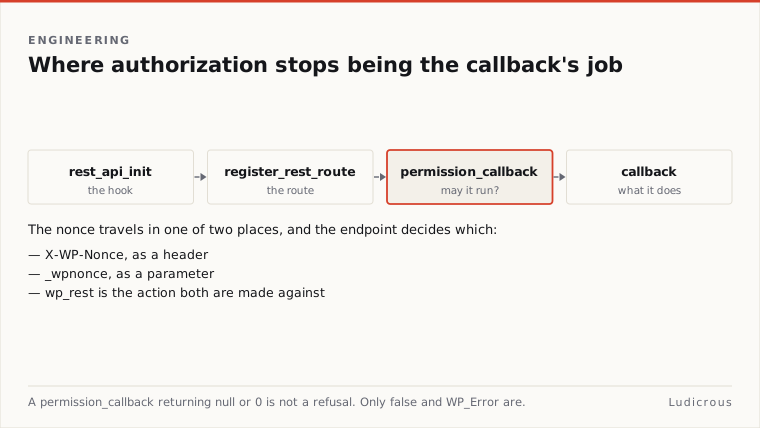
This separation prevents execution logic from running when a client lacks required capabilities. The primary callback receives an instance of WP_REST_Request, providing pre-parsed parameters, headers, and request body content directly to the handler.
Core controllers demonstrate this structure. In WP_REST_Posts_Controller::register_routes, each HTTP verb is mapped to a dedicated authorization check: - get_items_permissions_check for collection queries - create_item_permissions_check for record creation - update_item_permissions_check for record modifications - delete_item_permissions_check for record removals
Client Request
 │
 ▼
Rest_api_init Route Match
 │
 ▼
Permission_callback ──( false / null / WP_Error )──► 401/403 Forbidden
 │
 ( true )
 ▼
Callback( WP_REST_Request ) ───────────────────────► HTTP Response
Handling authorization in the routing layer rather than inside the main callback changes how applications interact with the server. The WordPress REST API Handbook states, a permissions callback enables the API to inform clients about permitted actions on a given URL without requiring the client to execute the full request first.
The Return Value Mechanics of permission_callback
The enforcement introduced in WordPress 5.5.0 makes permission_callback mandatory. Leaving the argument empty produces a formal error during route registration.
The internal logic governing permission_callback returns contains a specific behavioral trap. According to WordPress Developer Resources, access is disallowed only if the callback explicitly returns: - false - null - A WP_Error instance
Any other returned value grants access. This includes other falsey values, such as an empty string, an empty array, or the integer zero. A callback that calculates a numerical capability level and returns 0 upon failure will grant access to an unauthenticated visitor.
Developers who write capability checks must verify that failures return a strict boolean false or a configured WP_Error. Returning a WP_Error allows the endpoint to pass custom HTTP status codes and explanatory error messages directly to the client response payload.
// Insecure: returning 0 on failure evaluates to granting access
'permission_callback' => function {
 return 0; // Grants access
}
// Secure: explicitly returning false or WP_Error 'permission_callback' => function( WP_REST_Request $request ) { if (! current_user_can( 'edit_posts' ) ) { return new WP_Error( 'rest_forbidden', __( 'Cannot edit posts.' ), array( 'status' => 403 ) ); } return true; } ```
Nonce Transport Across Headers and Parameters
The REST API mirrors the authentication boundaries of the main WordPress installation. Public content remains openly queryable by default. Private content, draft statuses, and state-modifying operations require authentication or explicit data exposure through custom registration arguments.
Cookie-based authentication for front-end JavaScript requests relies on nonces generated with one specific action name: wp_rest. WordPress Developer News in August 2023 states that wp_rest is the required nonce action for REST communication. Passing a nonce created for a custom action string will cause authentication to fail.
The REST API accepts this nonce through two separate transport mechanisms: - The X-WP-Nonce HTTP request header - The _wpnonce body or query parameter
// Transport via HTTP header
Fetch( '/wp-json/custom/v1/resource', {
 method: 'POST',
 headers: {
 'X-WP-Nonce': wpApiSettings.nonce,
 'Content-Type': 'application/json'
 },
 body: JSON.stringify( { title: 'Updated Resource' } )
} );
Passing nonces inside HTTP headers cleanly separates authentication tokens from query strings and request bodies. This design prevents CSRF tokens from polluting URL strings or payload objects during serialization.
Architectural Boundaries and the Limits of Core Documentation
The official WordPress core documentation does not provide a single comparison page evaluating admin-ajax.php against the REST API for routing discoverability, response formatting, or CDN caching behaviour. The official handbooks provide detailed specifications for the REST architecture, but leave legacy AJAX mechanics documented separately.
What the technical documentation does confirm is the structural model of the REST API. Every custom route: - Registers on the rest_api_init action hook - Declares its URL schema and supported HTTP methods - Requires an explicit permission_callback that returns boolean or WP_Error values - Receives input through a typed WP_REST_Request object - Authenticates session cookies through the wp_rest nonce action
These mechanisms establish an explicit interface where routing, authentication, input validation, and execution logic operate through dedicated functions rather than procedural hooks. Constructing front-end endpoints on rest_api_init anchors custom code directly into core WordPress data architecture.