 Security & Ops
Security & Ops
The wp-config.php Settings That Actually Change Your Risk
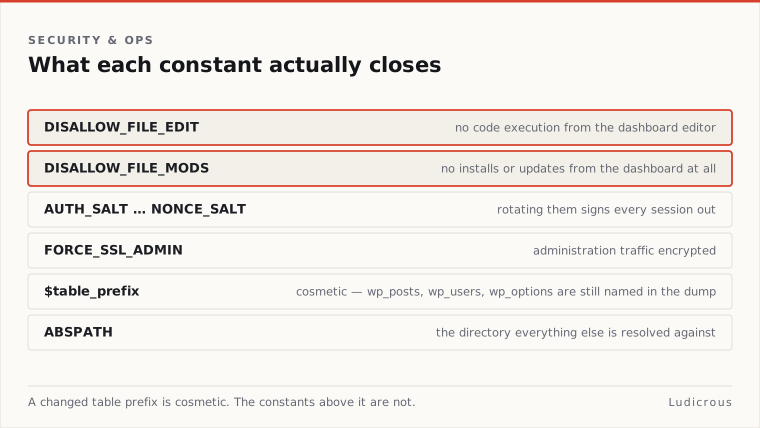
Setting DISALLOW_FILE_EDIT prevents administrators from modifying plugin and theme code directly inside the WordPress dashboard.
Last reviewed
Setting DISALLOW_FILE_MODS eliminates that editor entirely while blocking all plugin and theme installations and updates from the control panel.
The distinction changes how a compromised administrator account behaves. Under the first rule, an attacker with stolen credentials cannot paste malicious PHP into an existing file via the built-in editor. Under the second rule, that same attacker cannot upload a zipped plugin containing a web shell, cannot update an existing extension to overwrite its contents, and cannot install fresh tools. WordPress Developer Resources confirms that defining DISALLOW_FILE_MODS alone produces the identical restriction on the file editor as DISALLOW_FILE_EDIT. Applying both lines is redundant. Adding the broader rule removes the entire code-delivery pipeline from the administrative interface.
Every constant added to control these behaviors belongs in a specific position within wp-config.php. WordPress documentation specifies that developers must place these definitions above the comment line reading / That's all, stop editing! Happy publishing. /. Directives placed beneath that line load after WordPress initializes its runtime environment and defines its internal defaults, rendering late-declared constants ineffective.
Administrative Code Execution and the DISALLOW Constants
The WordPress dashboard includes an internal editor that allows direct file manipulation across active themes and plugins. Disabling this interface stops an intruder from altering live PHP files through an active administrative session.
Define( 'DISALLOW_FILE_MODS', true );Declaring DISALLOW_FILE_MODS as true alters the capabilities of the administrator role. The administrative interface drops the file editor submenus under the appearance and plugin tabs. It also hides the buttons used to upload new zip archives, install items from the official WordPress repository, or trigger automated updates for existing components.
Organizations running deployment pipelines via version control systems rely on this constant to prevent manual drift. If code changes occur exclusively through Git repositories and continuous deployment tools, running an open update mechanism in production creates configuration divergence.
A developer who only applies DISALLOW_FILE_EDIT leaves the upload mechanisms active. An unauthorized user with administrative privileges can bypass the missing editor by uploading a custom plugin crafted to execute system commands. The wider constant shuts down both avenues at once.
Session Invalidation Through Authentication Salts
The wp-config.php file stores eight distinct security keys and salts: AUTH_KEY, SECURE_AUTH_KEY, LOGGED_IN_KEY, NONCE_KEY, AUTH_SALT, SECURE_AUTH_SALT, LOGGED_IN_SALT, and NONCE_SALT. WordPress uses these random strings to secure authentication cookies and hash cryptographic nonces.
WordPress Developer Resources instructs site operators to change all authentication keys and salts whenever they suspect a compromise. Replacing these strings breaks the cryptographic validity of every session token stored in visitor and administrator browsers.
The immediate result is a global lockout:
- WordPress invalidates every existing authentication cookie across the site.
- Active administrative sessions terminate instantly.
- Logged-in subscribers and contributors lose access until they enter their credentials again.
- Stolen session cookies held by attackers become invalid strings that fail server verification.
Rotating keys does not repair an unpatched vulnerability, but it severs persistent access for unauthorized parties holding cloned cookies. The WordPress documentation frames salt rotation as an incident response tool rather than a static routine. Whenever administrative credentials leak or an engineer leaves an organization with production credentials, generating fresh salt values clears the deck immediately.
Encrypted Administration Traffic via FORCE_SSL_ADMIN
Transmitting administrative cookies over unencrypted channels allows local network observers to capture raw tokens. WordPress Developer Resources documents FORCE_SSL_ADMIN as the primary configuration setting to enforce SSL connections across administrative sessions.
Define( 'FORCE_SSL_ADMIN', true );Declaring FORCE_SSL_ADMIN as true prevents administrative screens from rendering over HTTP. When a user requests an administrative path without encryption, WordPress redirects the browser to the secure HTTPS equivalent before sending authentication data or rendering administrative forms.
WordPress Developer Resources lists FORCE_SSL_ADMIN as the core configuration constant for forcing SSL across the administrative dashboard. It does not provide detailed specifications for how the constant handles edge-case reverse proxy headers or split-domain setups. Ensuring the underlying web server presents a valid certificate remains a prerequisite before activating the directive in wp-config.php.
Table Prefixes, Directory Constants, and Database Limits
The database prefix variable sits near the top of the standard configuration file:
$table_prefix = 'wp_';WordPress uses $table_prefix to name its default tables, creating structures such as wp_posts, wp_users, and wp_options. The configuration file also defines ABSPATH, which WordPress Developer Resources records as the absolute directory path pointing to the WordPress core files on the server filesystem.
Security checklists regularly instruct developers to replace the default wp_ prefix with a custom string during installation. Jetpack treats changing the table prefix as an optional hardening measure rather than a foundational system requirement.
Altering this value on an established site introduces operational overhead. Jetpack notes that modifying the prefix after installation requires two coordinated steps:
- Changing the
$table_prefixstring insidewp-config.php. - Renaming every database table in the MySQL schema to match the new prefix string exactly.
The core WordPress documentation does not list changing table prefixes as an absolute barrier against structured query injection. An injection flaw that permits schema enumeration will reveal custom table names through standard database queries. Core documentation also omits an official minimum-privilege specification for the database user, leaving administrators to determine which specific MySQL permissions to grant based on their hosting environment.
Hardening Checklists and Cosmetic Defenses
Security guides circulating across the web routinely bundle proven configuration settings alongside cosmetic adjustments. Common checklist items include hiding the WordPress generator meta tag, masking the version number, and renaming the wp-login.php endpoint.
These adjustments obscure basic version strings from simple crawlers, but they do not alter the server's actual execution model. An outdated plugin or an unpatched core version remains vulnerable to targeted exploits regardless of whether the generator tag renders in the HTML header. Renaming the login endpoint moves the entry form, but automated scanning tools locate administrative hooks through alternative paths unless underlying access controls restrict traffic.
Primary WordPress documentation does not classify version hiding or login page relocation as verifiable defenses against determined intrusion. Moving the wp-config.php file one directory level above the web root defined by ABSPATH is another frequent checklist recommendation, yet primary documentation does not verify this technique as a universally applicable defense across different hosting architectures.
The configurations that make a measurable difference operate by revoking server-level capabilities. Defining DISALLOW_FILE_MODS stops unauthorized PHP execution through the dashboard. Rotating salts terminates compromised user sessions immediately. Enforcing FORCE_SSL_ADMIN prevents plaintext transmission of administrative sessions. Focus configuration work on directives that revoke execution permissions, rather than cosmetic changes that leave system capabilities untouched.