WordPress
How to Safely Turn Off WordPress Automatic Updates
The WordPress codebase separates core updates from extension updates, yet many site administrators still treat background updates as a single switch.
Last reviewed
Defining WP_AUTO_UPDATE_CORE as false in the configuration stops core releases, but it does not govern the entire update mechanism on its own. To disable WordPress automatic updates cleanly across an installation, administrators have to target the specific channel they want to silence.
Site managers managing client installations often discover that a setting applied to stop major software releases has either done nothing to plugins or shut down critical background security fixes. The core software contains distinct layers for development builds, minor maintenance releases, major versions, and extension assets. Managing them requires knowing which PHP constant or hook applies to which layer.
WordPress update controls are not one thing
The broadest switch available in the software is AUTOMATIC_UPDATER_DISABLED. When defined as true inside wp-config.php, this constant completely disables all automatic background updates. WordPress documentation confirms this behavior that adding define( 'AUTOMATIC_UPDATER_DISABLED', true ); to wp-config.php represents the simplest method for shutting down background updater routines.
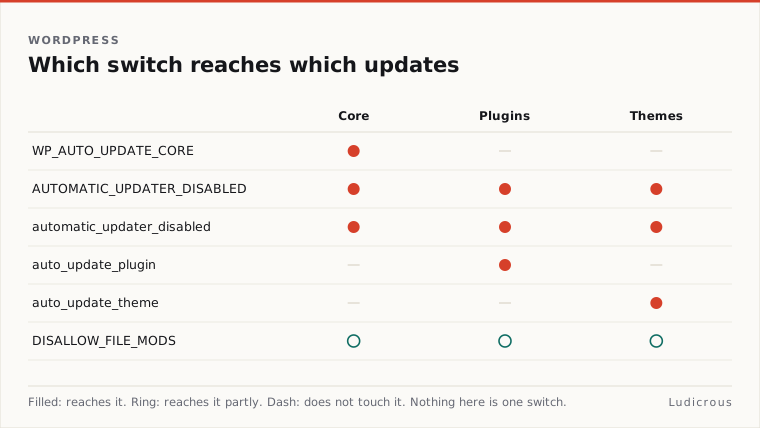
A programmatic equivalent exists in the WordPress hook system. WordPress documentation, documents the automatic_updater_disabled filter as an alternative way to disable all automatic background updates. When the Core Team introduced these controls in September 2013, the filter had initially been referred to as auto_upgrader_disabled before documentation corrected the name to automatic_updater_disabled.
Define( 'AUTOMATIC_UPDATER_DISABLED', true );Broader site locks also shut off these update tasks. According to the Core Team's 2013 documentation, defining DISALLOW_FILE_MODS disables automatic updates alongside its file-modification restrictions. If AUTOMATIC_UPDATER_DISABLED or DISALLOW_FILE_MODS is present and active, the background runner halts entirely.
That blanket behavior is not always what an agency or hosting provider wants. Shutting down the entire updater stops background security routines alongside standard updates. If an administrator only intends to restrict changes to the WordPress core engine, applying a universal kill switch overreaches.
How to keep security fixes while blocking feature jumps
Core software updates are governed separately through the WP_AUTO_UPDATE_CORE constant. WordPress support documentation on configuring automatic background updates, outlines three distinct states for this constant: true, false, and 'minor'.
Define( 'WP_AUTO_UPDATE_CORE', 'minor' );Setting WP_AUTO_UPDATE_CORE to true enables all three core channels: development builds, minor releases, and major releases. Setting the constant to false disables all three of those core channels completely. The Core Team confirmed in its 2013 release documentation that defining WP_AUTO_UPDATE_CORE as false restricts core updates specifically, leaving non-core components to their own rules.
The middle option offers a more measured configuration:
- When
WP_AUTO_UPDATE_COREis set to'minor', minor core updates remain enabled while development and major updates are disabled. - When set to
true, development, minor, and major core updates all run automatically. - When set to
false, development, minor, and major updates are all blocked from running.
For production client sites, the 'minor' value creates a protective boundary. It allows point releases that fix vulnerabilities or functional regressions to apply automatically. At the same time, it prevents the platform from executing major version jumps that introduce breaking architectural changes without administrative supervision.
Define( 'WP_AUTO_UPDATE_CORE', false );If a developer uses false, the platform will not apply any maintenance patches on its own. Every minor security release then requires manual intervention or an external deployment pipeline.
Plugins and themes use separate filters
Extending maintenance policy beyond the core engine requires using dedicated hooks. The WP_AUTO_UPDATE_CORE constant does not govern plugins or themes. Instead, WordPress documentation on configuring automatic updates, records specific filter hooks designed to handle these components.
Automatic plugin updates respond to the auto_update_plugin filter. Themes rely on the corresponding auto_update_theme filter documented alongside it.
These filters evaluate update routines independently of the core constant. A developer can leave minor core updates enabled through WP_AUTO_UPDATE_CORE while attaching custom functions to auto_update_plugin or auto_update_theme to prevent third-party code from updating in the background. Because extensions frequently interact with custom templates and external APIs, isolating their update routines prevents unexpected code changes from breaking customer-facing functionality.
Using filters requires adding code through a custom plugin, a site-specific utility file, or a theme functions file. If those filters return a negative response, WordPress bypasses automated updates for those specific asset types while keeping the rest of the installation functioning according to its global constants.
Why wp-config.php is the durable place for policy
The core configuration file, wp-config.php, acts as the standard location for environment-level directives. The WordPress Core Team explicitly identified wp-config.php in its September 2013 guidance as the location to place AUTOMATIC_UPDATER_DISABLED and WP_AUTO_UPDATE_CORE.
Constants defined in wp-config.php initialize before the rest of the application loads. By placing update rules in this file, administrators ensure the rules apply before active themes or standard plugins register their hooks. It also keeps platform rules in a file typically managed through version control or deployment automation, rather than scattered across database entries or active theme templates.
When administrators rely strictly on runtime filters placed inside theme folders, switching the active theme can silently discard the update policy. Placing constants in wp-config.php keeps the site operating under fixed administrative boundaries regardless of front-end template changes.
The operational choice between automation and manual patching
Disabling automated background tasks changes how a site must be managed. When an administrator defines AUTOMATIC_UPDATER_DISABLED as true or sets WP_AUTO_UPDATE_CORE to false, the software ceases to protect itself against newly discovered vulnerabilities.
The operational decision comes down to where an agency wants to draw the line between automated stability and manual review:
- Setting
AUTOMATIC_UPDATER_DISABLEDtotrueshuts down all automatic background routines across core, plugins, themes, and translation files. - Setting
WP_AUTO_UPDATE_COREtofalsestops every core version update while leaving non-core background updates subject to their own settings. - Setting
WP_AUTO_UPDATE_COREto'minor'allows security and maintenance fixes through while preventing breaking major version migrations. - Using
auto_update_pluginandauto_update_themetargets third-party code updates without altering core engine behavior.
Deciding to disable WordPress automatic updates shifts the responsibility for software integrity entirely to the system administrator. If automation is disabled to prevent site breaks, manual testing and deployment workflows must replace it. Choosing between global constant definitions and component-specific filters determines whether an installation remains partially self-healing or requires hands-on maintenance for every single patch release.