WordPress
Registering a Custom Post Type Without Reaching for a Plugin
WordPress requires custom post types to be registered on the init hook, where a single function call ties a 20-character database key to an array of runtime settings.
Last reviewed
Registering a content type directly in code gives developers a portable, version-controlled definition that does not depend on third-party administrative plugins.
Getting the implementation right depends on understanding database schema limits and rewrite rule regeneration. The official function reference for register_post_type in WordPress Developer Resources specifies that registration must not occur before init. A standard implementation uses the add_action( 'init', 'my_cpt_init' ); pattern to attach the definition to the WordPress loading sequence.
The Core Registration Hook and the 20-Character Database Column
The custom post type key is an identifier written directly to the database. The WordPress Plugin Handbook documents a strict 20-character limit for any post type key passed into register_post_type.
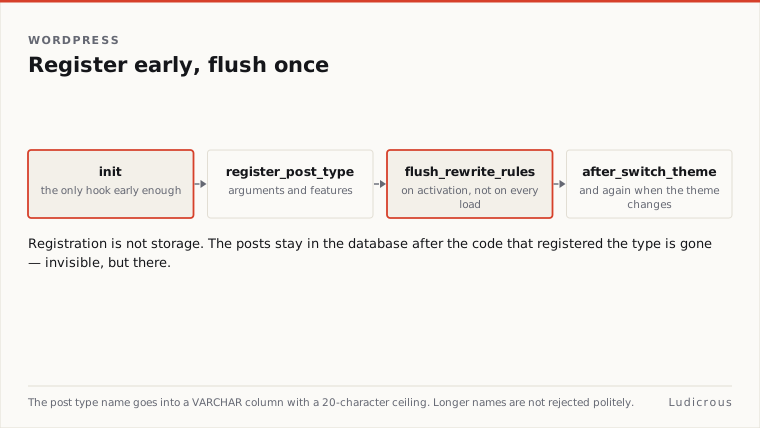
This limit is rooted in the database schema. The WordPress database stores post records with a post_type column defined as a VARCHAR field restricted to 20 characters. Passing a string longer than 20 characters risks truncation in the database table, corrupting the relationship between the registered definition in code and the saved rows in the database.
According to WordPress Learn, register_post_type accepts two parameters: the post type name string and an array of arguments defining its behaviour. The identifier chosen during initial development persists across every record created under that content type.
When querying registered content types, WordPress relies on the arguments supplied during that initial declaration. The register_post_type reference notes that the input passed into the function forms the dataset that get_post_types queries across the application. In that context, the documentation highlights the $public attribute as a primary filtering property for returning registered post types across the site.
Arguments, Core Features, and Querying Post Types
The argument array passed to register_post_type governs how the post type behaves across the WordPress administrative screens and public endpoints. The registered_post_type hook documentation outlines that custom post types can declare support for built-in core features.
These core features include meta boxes, custom fields, post thumbnails, post statuses, and comments. Declaring these features explicitly in the registration array dictates which editing controls appear on the content screen. A post type registered without thumbnail support will not expose the featured image interface, while a post type configured with custom fields opens standard metadata inputs.
Because register_post_type configures core systems in memory, running the function too early breaks core execution. The documentation in WordPress Developer Resources specifies that custom post types should not be hooked before init. Hooking before init causes registration to execute before user authentication, rewrite rules, and default taxonomies finish loading.
The properties assigned in the argument array register the content type with core lookup functions. Code calling get_post_types inspects the exact properties passed at init, allowing plugins and themes to discover post types based on attributes such as $public. Keeping the declaration inside code ensures these properties remain identical across development, staging, and production environments.
Rebuilding Rewrite Rules on Activation
The most common failure after registering a custom post type in code is an immediate 404 error when viewing single post URLs. This occurs because WordPress stores URL rewrite rules in the database and does not automatically rebuild that internal routing table on standard page requests.
WordPress Developer Resources documents flush_rewrite_rules as a utility that removes stored rewrite rules and recreates them from scratch. The documentation states that flush_rewrite_rules is useful with custom post types because new custom post types usually need manual flushing of the rewrite rules to generate public URL routes.
The Rewrite API documentation in the Common APIs Handbook explains that rewrite rules require a one-time use of flush_rules to take effect. Without this step, WordPress compares incoming URLs against its stale cache of rewrite rules, missing the rules associated with the newly added post type.
To resolve this during plugin deployment, WordPress provides a standard activation hook pattern. The documentation shows an activation-hook example that calls the custom post type registration function directly and then executes flush_rewrite_rules on activation.
Function my_cpt_register {
 register_post_type( 'book', array(
 'public' => true,
 'supports' => array( 'title', 'editor', 'thumbnail', 'custom-fields', 'comments' ),
 ) );
}
Add_action( 'init', 'my_cpt_register' );
Function my_cpt_activate { my_cpt_register; flush_rewrite_rules; } Register_activation_hook( __FILE__, 'my_cpt_activate' ); ```
This sequence registers the post type during the activation request so WordPress recognises the new structure before rebuilding the route table. Calling the registration function inside the activation callback provides the necessary schema definitions before the flush operation runs.
Theme Switches and Persistent Database Storage
Custom post types declared in a theme file require an alternate hook structure because theme activation does not trigger plugin activation hooks. In the register_post_type documentation, WordPress Developer Resources includes an example showing after_switch_theme paired with a rewrite flush routine.
When a theme containing post type declarations is activated, the after_switch_theme action runs, rebuilding the rewrite cache once for the newly active theme. This guarantees that visitors can navigate to single custom post type entries immediately after a theme switch.
Writing custom post type declarations directly into code protects site architecture during routine maintenance. Storing post type definitions in version control provides a clear history of changes to supported features, such as comments or custom fields.
The 20-character identifier stored in the database post_type column acts as the permanent link between database rows and code definitions. Because the database schema relies entirely on that column string, the identifier declared in register_post_type remains tied to stored posts across the entire lifecycle of the site.