 Engineering
Engineering
The PHP Deprecations That Break Old WordPress Code
Dynamic properties are deprecated as of PHP 8.2.0, and WordPress.com said in 2024 that behavior deprecated in that release will be removed in PHP 9.
Last reviewed
For developers maintaining legacy sites, server runtime upgrades require active code review. Routine environment updates expose dormant code paths, filling server records with deprecation notices that will eventually turn into hard execution halts.
The primary friction points do not originate within core WordPress files. Older themes and unmaintained extensions trigger the bulk of these warnings when modern PHP interpreters enforce strict typing and forbid ad-hoc property definitions. Understanding why php deprecation warnings wordpress plugins generate appear in server logs requires examining the specific syntax patterns PHP has retired.
Null Arguments in Core String Functions
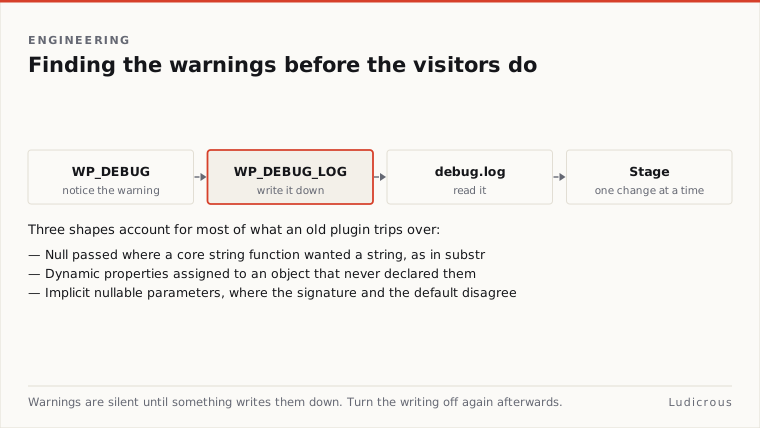
A common failure mode in older code surfaces when standard built-in functions receive null instead of an explicit string. In a WordPress.org support thread documenting PHP 8.4 compatibility issues, developers reported deprecation warnings stating: substr: Passing null to parameter #1 ($string) of type string is deprecated.
This notice highlights a shift in PHP standard library type enforcement. Legacy WordPress plugins written for earlier PHP versions frequently passed uninitialised variables, empty database option values, or unset post metadata directly into string manipulation routines. Older PHP engines silently coerced null into an empty string without alerting the developer. PHP no longer permits this silent type conversion without issuing an explicit warning.
When such code runs on newer runtimes, every execution of a string operation against an unset value records an entry in the system log. If a plugin executes these calls inside a loop or during template rendering, the generated logs swell rapidly. While the page might continue to render for visitors, the underlying code violates the contract required by current and future PHP releases. Resolving this pattern requires ensuring variables passed to string functions are initialized as strings or checked prior to execution.
The Deprecation of Dynamic Properties
The PHP Manual states, dynamic properties are deprecated as of PHP 8.2.0. In older versions of the language, assigning a value to an undeclared property on a class instance caused the runtime to create that property automatically. That behavior has been phased out across the language.
The creation of dynamic properties is deprecated unless a class opts in using the # attribute. Without this attribute, any assignment to an undeclared class member triggers an engine notice. The WordPress hosting handbook notes that because PHP 8.2 deprecates dynamic properties, properties should be pre-declared directly inside class structures.
Legacy cryptographic and utility packages bundled inside older plugins show this breakdown clearly. In the WordPress.org support thread analyzing PHP 8.4 warnings from bundled cryptography libraries, logs recorded Crypt_Rijndael::$key_size is deprecated due to dynamic property creation. The Crypt_Rijndael class attempted to assign $key_size without a formal property declaration in the class body.
WordPress.com said in 2024 that behaviors deprecated in PHP 8.2 will be removed in PHP 9. When PHP 9 arrives, dynamic property assignments lacking the opt-in attribute will no longer emit mild deprecation warnings. They will generate fatal runtime errors.
Implicit Nullable Parameters and Signature Mismatches
Another structural change arrived when PHP 8.2 deprecated implicitly nullable parameters. The official PHP Manual states that this deprecation was introduced to align with user-defined functions where scalar types need to be marked nullable explicitly.
In earlier PHP versions, declaring a parameter with a type hint followed by a default value of null marked the parameter as nullable implicitly. Under the rules introduced in PHP 8.2, this syntax is deprecated. The type must be declared as nullable explicitly using a leading question mark or a formal union type.
WordPress plugin support forums document real instances of this syntax tripping up active tools. A WordPress.org support thread titled "PHP warnings when editing post" recorded a deprecation notice pointing directly to WPStaging\Staging\Service\StagingSetup::renderAdvanceSettings. The notice warned that implicit nullable parameter marking was deprecated in that function signature.
Because function signatures are evaluated when scripts are parsed, outdated parameter definitions trigger notices during regular administrative tasks. Loading editor screens, saving posts, or running maintenance routines will trigger repeated entries in the debug log whenever affected methods load into memory.
Isolating Warnings with WP_DEBUG and Debug Logs
Diagnosing deprecation notices requires an environment where errors are recorded without disrupting visitors. The WordPress Advanced Administration Handbook details how the core debugging constants operate. Enabling WP_DEBUG causes notices about deprecated functions and arguments in WordPress to surface.
The same handbook states that WP_DEBUG_LOG saves errors to wp-content/debug.log by default. This local file serves as the audit record for any deprecation triggered across themes, plugins, and core files during user interactions or automated tasks.
A WordPress staging guide from WPFactory outlines how developers should approach this diagnostic phase. The documentation advises testing the same plugins and theme on a staging copy under the new PHP version before raising PHP on the live site. WPFactory notes that developers should keep logging enabled while hiding errors from visitors so notices can be reviewed in wp-content/debug.log. This configuration ensures that deprecation warnings populate the log file without altering the front-end layout or exposing technical paths to the public.
Executing the Staged Migration Workflow
Resolving deprecation warnings requires a disciplined upgrade sequence. According to the WPFactory guide, developers must resolve deprecation notices on staging first, then apply the upgrade to production.
Reviewing wp-content/debug.log on the staging site reveals the exact file paths and line numbers responsible for each warning. When logs point to dynamic properties in custom code, developers must declare the property explicitly within the class definition or add the # attribute above the class declaration. When logs record null values passed into functions like substr, the calling code must be modified to validate input variables.
Once code modifications are applied, testing must cover administrative actions, post editing, and front-end browsing on the staging copy. Verifying that wp-content/debug.log remains clean after exercising these workflows confirms that legacy syntax has been remediated. Only after the staging environment runs without generating deprecation notices should the production server switch to the newer PHP release.