WordPress
Transients or Object Cache: Which One Your Site Actually Needs
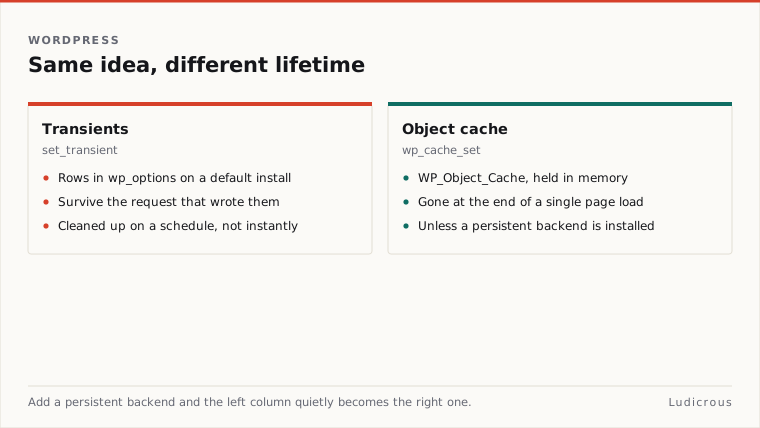
On a default WordPress installation without external caching software, calling set_transient writes records directly into the wp_options database table.
Last reviewed
Add a persistent drop-in backend such as Memcached, and that identical function call stops touching the database entirely, routing its payload into memory by wrapping wp_cache_set.
This underlying switch creates routine confusion when developers compare the Transients API and the WordPress Object Cache. Code written with the assumption that a transient always produces a persistent database row will behave differently the moment a site migrates to an infrastructure stack with an active object cache backend.
The distinction between set_transient and wp_cache_set is not merely a matter of naming conventions. The two APIs serve different operational scopes depending on whether data must survive across separate web visits or execute strictly within the boundaries of a single request.
Database Rows and Request Cleanups in Default Installs
According to the Make WordPress Hosting handbook, environments operating without a persistent object cache rely on set_transient to store values in the wp_options table. The Transients API provides a mechanism to retain cached information temporarily, assigning each entry a custom string identifier alongside an expiration timeframe.
The expiration value passed to set_transient defines the maximum number of seconds the system should retain that data before refreshing it. The WordPress Developer Blog notes that the core Transients API was explicitly designed to store information across separate page loads. When a script runs an expensive database query or fetches data over an external network connection, saving that output via a transient allows subsequent visitors to reuse the pre-calculated output instead of repeating the computation.
+-------------------------------------------------------+
| Default WordPress Architecture (No Persistent Drop-in)|
| |
| set_transient ----------> wp_options Database |
| wp_cache_set ----------> Memory (Page Load Only) |
+-------------------------------------------------------+
The storage mechanism inside the database relies on an on-demand cleanup process. The documentation for the core WP_Object_Cache class states that expired transients remain inside the wp_options table until an incoming HTTP request specifically accesses them and triggers a cleanup.
Because of this mechanism, expired transient records do not vanish automatically at the exact second their timer lapses. They sit in table storage until a visit calls the transient key, finds the expiration timestamp in the past, and handles the removal. As documented in the wp transient WP-CLI documentation, the transient cache defaults to using the WordPress database to persist values across requests, ensuring that data survives server restarts and separate browser visits without requiring additional server configuration.
How Persistent Backends Reroute Transients
The operational model changes completely when server administrators install a persistent cache drop-in. The documentation for the WP_Object_Cache class notes that backends such as Memcached provide persistent caching for the WordPress object cache layer.
Once a persistent cache drop-in is active, the Transients API alters its execution path. The Make WordPress Hosting performance guide documents that set_transient acts as a wrapper for wp_cache_set when an object cache is enabled. The wp transient WP-CLI documentation confirms this behavior: when a persistent object cache drop-in is present, the transient system bypasses the database completely and wraps the object cache instead.
+-------------------------------------------------------+
| Persistent Backend Architecture (e.g., Memcached) |
| |
| set_transient ---\ |
| +-----> wp_cache_set (RAM) |
| wp_cache_set ---/ |
+-------------------------------------------------------+
The WordPress Developer Blog points out that after a persistent cache is installed, the Transients API no longer writes records to the wp_options table via the Options API. The transient data lives inside the memory store managed by the persistent backend.
This architectural shift means that queries to the database are eliminated for transient reads and writes. A developer inspecting the wp_options table on a site using Memcached will find that newly set transient keys no longer appear as database rows. The function call remains identical in the application code, but the storage engine shifts from disk-based database tables to an in-memory cache daemon.
Single Page Loads and the Role of wp_cache_set
The low-level caching interface in core is handled through wp_cache_set. The official function reference states that wp_cache_set saves data directly to the object cache.
The lifespan of that cached data depends entirely on the presence of a persistent backend. When a site does not have an external object cache installed, the object cache lives only in PHP memory for the duration of the current script execution.
Request Begins ---> wp_cache_set writes to PHP RAM ---> Output Sent ---> RAM ClearedDevelopers seeking to keep data cached strictly during a single page load should rely on wp_cache_set and wp_cache_get. This single-request lifecycle prevents duplicate database queries inside a single script run. If three separate template tags, sidebar widgets, or filter hooks require the exact same dataset during the generation of one page, placing the result in wp_cache_set allows subsequent functions on that same page load to retrieve it from memory without re-querying the database.
When the server finishes rendering the HTML output and transmits it to the client, PHP clears the in-memory object cache. For sites running without an object cache where transient persistence is unnecessary, wp_cache_set and wp_cache_get serve data that disappears immediately after the page finishes loading.
Mapping the API Call to Site Infrastructure
Choosing the appropriate API requires evaluating both the operational intent of the data and the hosting environment where the code executes.
 Does data need to survive across requests?
 / \
 Yes No
 / \
 Use set_transient Use wp_cache_set
 (Stores in database; (Stores in PHP RAM;
 moves to object cache persists only if a
 if backend is present) backend is present)
The operational rules break down according to persistence requirements:
- Use
wp_cache_setwhen storing data intended to prevent duplicate executions inside one HTTP request. On default sites without an external cache, this call remains isolated in PHP memory and drops out of existence once the page renders. - Use
set_transientwhen data must survive across multiple visitor requests on standard hosting stacks. Without a persistent cache,set_transientensures cross-request persistence by writing the payload and its maximum expiration seconds into thewp_optionstable. - Account for persistent cache drop-ins during development. If a site runs Memcached or a similar system,
set_transientdelegates storage directly towp_cache_set, routing both APIs through the persistent memory engine.
The core codebase handles the persistence layer dynamically, switching the mechanics of set_transient based on server configuration. A transient call acts as a persistent database option on standard environments and as an in-memory object cache key on setups with dedicated backends.