 Tooling
Tooling
Finding What Actually Shifted Your Layout
Every unexpected visual jump on a web page is recorded by the browser as a LayoutShift entry containing a specific property called sources.
Last reviewed
As documented by web.dev, this array identifies up to five DOM elements displaced during a single layout shift, exposing the exact document nodes responsible rather than forcing developers to inspect stylesheet cascades by eye.
The browser logs the shift. Chrome documentation, defines layout shifts as occurrences where elements move despite the absence of user interaction. To isolate whether a displacement stems from an automated reflow or follows human intent, the Performance API tags each recorded jump with a timing property that tracks recent keystrokes and clicks.
Inspecting LayoutShiftAttribution Objects
The browser does not just flag that a shift occurred. It stores the coordinates before and after the move.
As documented by MDN Web Docs, reading LayoutShift.sources returns an array populated by LayoutShiftAttribution objects. Each attribution object in that list points directly to an affected HTML node. As documented by web.dev, every source entry can expose three distinct properties: node, prevRect, and curRect.
The node property provides a direct reference to the moving DOM element. Meanwhile, prevRect and curRect define the bounding boxes before and after the layout displacement. Comparing these two rectangles reveals the vertical offset, horizontal movement, and dimensional adjustments that took place during the render pass.
There is an upper boundary to this telemetry list. According to web.dev's March 2021 debugging guide, the sources array caps its output at five entries. If a reflow shifts dozens of paragraphs down the page simultaneously, the browser reports only the five largest impacted sources. That design keeps memory overhead bounded while pointing engineers directly toward the primary contributors to visual instability.
Monitoring Live Entries With PerformanceObserver
Telemetry data stored during page initialization remains accessible throughout the lifecycle of the session.
Developers do not need specialized external instrumentation to intercept these displacement records. Standard web scripts can instantiate a PerformanceObserver instance configured with the options object {type: 'layout-shift', buffered: true}. As documented by web.dev, highlights that the buffered: true flag instructs the browser to yield layout shift records that occurred before the observer script initialized.
Once registered, the observer callback processes entries containing three core fields:
value: the calculated score of the individual shift.startTime: the precise timestamp when the layout alteration took place.sources: the attribution list holding the moving nodes and their bounding boxes.
Running this observer directly in the console produces an immediate log of every unstable layout event. When a banner loads late, the observer fires. The developer can expand the sources array in the browser console, hover over the node reference, and inspect the exact HTML element highlighted in the viewport.
Filtering User Actions With the 500-Millisecond Window
Not every screen movement qualifies as an unexpected layout shift.
When a reader taps a dropdown menu or clicks an accordion header, elements beneath the interactive target frequently shift position to make room for new content. According to MDN Web Docs on April 13, 2023, layout shifts resulting from direct user interactions are often excluded from layout shift metrics.
The browser enforces this distinction through the hadRecentInput boolean property.
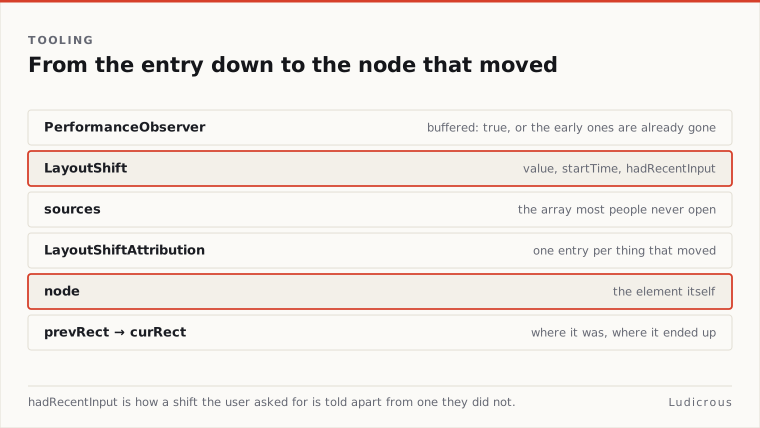
MDN Web Docs specifies that hadRecentInput evaluates to true whenever the layout shift's timestamp falls within 500 milliseconds of lastInputTime. If a user touches a screen or clicks a mouse button, any layout repositioning triggered during the subsequent half-second window receives this flag.
Filtering observer logs by checking hadRecentInput === false allows developers to discard expected responses to user commands. This separation isolates structural defects from user-driven UI transformations.
The Four Documented Culprits Behind Unstable Frames
Visual jumps documented in browser performance logs consistently point back to four architectural patterns.
First, unsized media elements represent a frequent source of layout movement. In guidance published on May 5, 2020, web.dev identifies images without dimensions alongside ads, embeds, and iframes lacking dimensions as primary causes of poor Cumulative Layout Shift. Chrome's performance insights documentation, similarly lists unsized images and injected iframes among the primary culprits. When an HTML document renders an <img> or <iframe> tag without explicit sizing attributes, the browser allocates zero vertical height during initial layout. As soon as the binary media data streams across the network and decodes, the browser expands the container box, pushing all downstream content down the screen.
Third, web fonts introduce visual jumps through text reflows. Chrome for Developers documentation notes that web fonts cause shifts through Flash of Unstyled Text (FOUT) or Flash of Invisible Text (FOIT). When a custom web font finishes downloading, the browser swaps out the fallback typeface or paints text that was previously transparent. Because the typography metrics of the downloaded font differ from the default system font, text lines reflow across paragraphs, altering container heights and shifting adjacent blocks.
Fourth, manipulating non-composited CSS properties causes layout shifts during interface animations. According to web.dev's May 2020 optimization guide, modifying the top and left properties triggers layout shifts even if the target element resides on its own rendering layer. Chrome documentation on October 8, 2025, specifically cites unoptimized animations as a common cause of layout instability. While animations intended to glide across the screen might appear isolated, properties that force the browser engine to recalculate geometry will trigger LayoutShift events.
Isolating Shift Triggers and Moving Nodes
Diagnosing layout instability requires connecting the reported node in LayoutShift.sources back to the code path responsible for its movement.
A developer tracking an unstable layout should first review the sources array to establish whether the reported node moved on its own or was shoved by something above it. Because sources lists the elements that moved, a reported paragraph tag is often the victim rather than the instigator. Examining prevRect and curRect reveals whether the element changed its own dimensions or merely altered its top coordinate.
If the top coordinate changed while width and height remained identical, the cause is an insertion or expansion occurring higher up the DOM tree. That shift points directly to an unsized image, an injected ad iframe, or a font swap on a prior heading. Conversely, if an element's dimensions expanded from zero, that node is the actual source of the reflow.
By querying PerformanceObserver logs, filtering out events where hadRecentInput is true, and cross-referencing the displaced nodes against unassigned media dimensions, font swaps, injected frames, and top or left animations, developers can isolate the exact mechanical reason behind any layout shift on the page.