 Security & Ops
Security & Ops
Application Passwords, and When a Real Password Is the Wrong Credential
WordPress core ships with a dedicated credential system that isolates programmatic API access from interactive account logins.
Last reviewed
Introduced in WordPress 5.6, the feature—known as Application Passwords—allows external software, scripts, and remote services to authenticate against a specific WordPress user account without requiring the user’s primary account password.
According to WordPress developer documentation, an Application Password cannot be used to log into the administrative dashboard via wp-login.php. It exists specifically for API authentication, including the WordPress REST API. If a third-party service, background script, or integration token is compromised, a site owner can revoke that single credential from the WordPress admin interface without resetting the user's primary password or interrupting other connected tools.
API Authentication Separated from User Logins
When an external client needs to interact with a WordPress site, using the account owner's real password creates an architectural and operational liability. Sharing that primary secret grants unrestricted access to the entire administrative dashboard via the browser, exposes the user's interactive session to credential theft, and forces a disruptive password reset across all devices if the secret leaks.
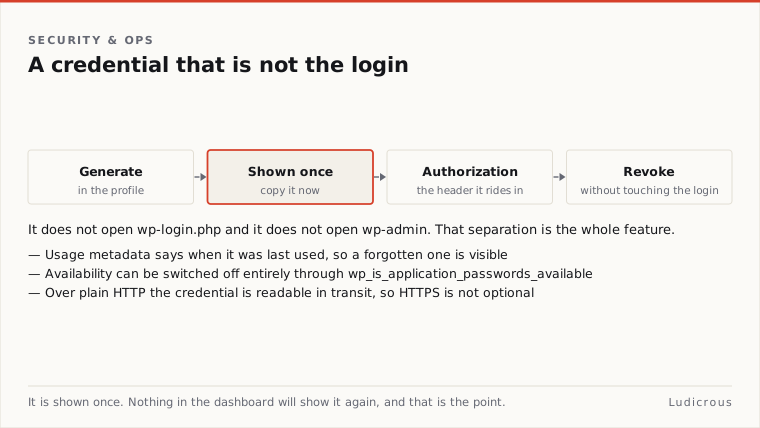
Application Passwords solve this separation problem directly in core. Each generated application credential functions as an independent, revocable string tied directly to a single WordPress user account. The credential carries the capabilities of that specific user, but its operational surface remains strictly restricted to programmatic channels.
In the REST API authentication documentation, WordPress specifies that Application Passwords can be passed to REST API requests served over HTTPS using HTTP Basic Authentication, defined by RFC 7617. When an automated script makes an HTTP request to an endpoint, it supplies the WordPress username and the generated application string in the Authorization header. WordPress validates the credential against the user record, assigns the corresponding permissions to the incoming request, and processes the call.
Because the credential does not authenticate interactive sessions at wp-login.php, obtaining an Application Password does not give an attacker a direct path into wp-admin through a standard web browser. The credential operates purely on the API layer, giving developers a structured mechanism to connect external scripts while keeping direct administrative access isolated behind the main user password.
Generation, Transport, and One-Time Display
Site owners and developers generate Application Passwords directly within the WordPress administrative interface or via the core REST API itself.
Within the admin dashboard, an individual user can generate a key by navigating to Users, then Profile. Site administrators who need to provision access for another account can navigate to Users, select All Users, and open the specific user record via Edit User.
Near the bottom of the user profile screen, WordPress presents the Application Passwords management area. The creation process follows a specific sequence:
- The user enters a descriptive name for the application in the text field to label what script or external system will use the key.
- The user submits the form by clicking the button to add a new application password.
- WordPress generates a random string and displays it immediately in a distinct notification banner.
- The administrator or user copies the credential immediately, as the full secret is displayed only once on screen.
- The client application stores the credential securely within its configuration environment for programmatic transmission.
Once the page is refreshed or navigated away from, the cleartext string cannot be viewed again within wp-admin. If the generated string is lost before it is copied, the credential cannot be retrieved; it must be deleted and replaced with a newly generated key.
For automated provisioning workflows, the WordPress REST API handbook documents programmatic management endpoints under /wp/v2/users/<user_id>/application-passwords. This endpoint structure allows authenticated management tools to list, create, and delete application credentials programmatically without manually opening the profile interface in a browser.
Inspecting Usage Metadata and Revoking Access
The Application Passwords interface on the user profile screen doubles as an auditing log and revocation console. Every issued credential appears in an administrative table alongside operational metadata captured during runtime requests.
This management table displays three distinct pieces of information for every active credential:
- The custom name assigned to the key at creation time.
- The timestamp indicating when the credential was last used to make an authenticated request.
- The last IP address from which an authenticated request using that credential originated.
This recorded metadata allows site owners to inspect how external scripts interact with the site. If a credential assigned to a publishing script shows an unexpected IP address, or if an old integration shows no recorded usage over an extended period, administrators can act on that specific key without altering other site operations.
Revocation is granular. Next to each credential in the table, WordPress provides a Revoke button. Selecting Revoke immediately invalidates that single string in the database. Any subsequent API request presenting the revoked key receives an authentication error, while the user’s main account password, interactive browser sessions, and all other active Application Passwords remain completely unaffected. The interface also includes a control to revoke all application passwords for the user at once, terminating every external API integration connected to that specific account in a single step.
HTTPS Requirements and Core Availability Filters
WordPress enforces transport security before it permits Application Passwords to function. By default, the feature is available only when requests are served over HTTPS.
Because the authentication mechanism uses Basic Auth over RFC 7617, the username and application password travel across the network as an encoded string within the HTTP headers. Over an unencrypted HTTP connection, any intermediary on the network path could intercept and read that credential in plaintext. To eliminate this exposure, WordPress disables the feature automatically on non-secure connections, hiding the profile generation UI and rejecting API authentication attempts made over HTTP.
In environments where developers need to alter this behavior, WordPress core provides an internal programmatic hook. The boolean filter wp_is_application_passwords_available allows developers and server administrators to modify whether the Application Passwords system is active.
A site administrator can attach a callback to wp_is_application_passwords_available to return false, disabling the entire credential subsystem across the installation regardless of HTTPS status. Conversely, in specialized local development environments operating without local SSL certificates, developers sometimes use the filter to test API calls over standard HTTP. In production environments, however, maintaining default HTTPS enforcement ensures that transmitted headers remain encrypted end to end.
Gaps in the Published Specifications
While the core documentation defines the issuance mechanics, the HTTPS transport requirement, the Basic Auth standard, and the profile management tools, the official developer documentation leaves several operational areas open.
The documentation does not publish a formal schedule for credential rotation. It demonstrates how to revoke a key and how to view last-used timestamps, but the platform does not enforce automatic expiration dates or mandate periodic replacement.
Similarly, the WordPress documentation does not prescribe specific external secrets-management storage patterns for third-party scripts, nor does it publish a formal post-incident log checklist beyond the display of the last used time and last IP in the profile table. When diagnosing unexpected requests, site administrators must rely on the recorded IP and timestamp shown in the admin table, as core documentation does not detail secondary logging workflows for failed application password attempts.
When an API integration must be retired or a key is suspected of exposure, the authoritative recovery path provided in the documentation remains immediate individual revocation through the user profile screen or the /wp/v2/users/<user_id>/application-passwords REST endpoint.