 Security & Ops
Security & Ops
Adding a Content Security Policy Without Breaking the Admin
Enforcing a content security policy on WordPress without diagnostic data routinely breaks the site.
Last reviewed
Applying strict headers immediately to an active installation often locks out the block editor, halts REST API exchanges, or drops essential script dependencies from third-party plugins.

MDN Web Docs states, Content-Security-Policy-Report-Only provides a non-enforcing mechanism that emits violation notices across HTTP connections without blocking page components. Rather than guessing which directives the administrative screen requires, developers can observe genuine traffic patterns first.
Content-Security-Policy-Report-Only: default-src 'self'; script-src 'self'; style-src 'self'; report-to csp-endpoint;A policy built from real browser reports keeps the administrative interface functional while restricting unauthorized execution on public templates.
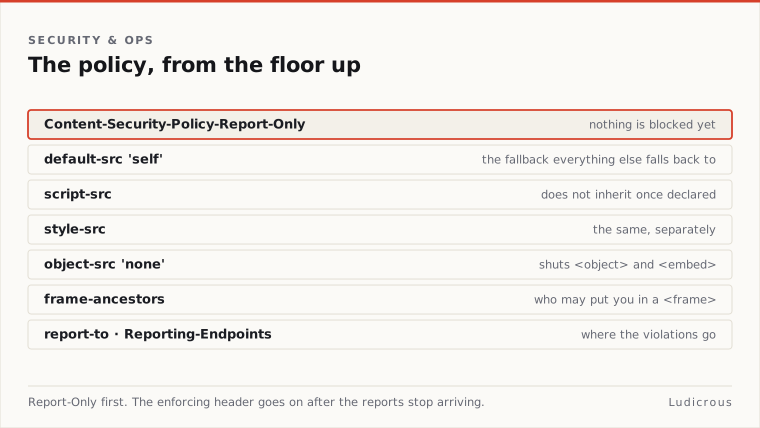
Non-Enforcing Deployment via Report-Only Headers
A production policy should never begin in enforcement mode. The non-enforcing header transmits violations to a designated collector while allowing scripts, stylesheets, and embedded frames to execute normally. Jetpack's WordPress security guidance notes that running a reporting endpoint alongside Content-Security-Policy-Report-Only represents the safest method for testing rules prior to strict enforcement.
Delivery of these violation notices has changed under current browser standards. The W3C Content Security Policy Level 3 specification states, states that the legacy report-uri directive is deprecated in favour of the report-to directive. MDN Web Docs notes that modern browsers supporting report-to ignore report-uri entirely when both appear in a header payload.
Modern reporting requires two linked headers:
Reporting-Endpoints: csp-endpoint="https://example.com/wp-json/sam/v1/report"Content-Security-Policy-Report-Only: default-src 'self'; script-src 'self'; style-src 'self'; report-to csp-endpoint;
The Reporting-Endpoints response header establishes the destination name and URL. The CSP header then references that endpoint name via report-to. Chrome for Developers confirms that defining an explicit reporting destination provides site operators with the telemetry needed to track breakage across diverse user environments.
Resource Directives and Fallback Structures
A functional content security policy relies on explicit directives rather than generic defaults. MDN Web Docs states that script-src restricts the valid execution sources for JavaScript, whereas style-src governs the origins from which CSS stylesheets may load.
When a specific resource type lacks a declared directive, browsers rely on default-src. MDN Web Docs explains that default-src serves as a universal fallback for most fetch directives. If script-src is omitted, the browser evaluates script tags against the rules defined inside default-src.
Other directives operate under separate containment rules:
object-srcregulates the execution of<object>and<embed>elements. CentralCSP documentation clarifies thatobject-srcfalls back todefault-srcif not declared explicitly.frame-ancestorsspecifies which external origins may embed the page inside<frame>,<iframe>,<object>, or<embed>tags. MDN Web Docs notes thatframe-ancestorsdoes not fall back todefault-src, making explicit declaration necessary to mitigate clickjacking.
Setting object-src 'none' closes legacy plugin execution vectors directly. Leaving default-src 'self' provides a baseline fallback, but administrators must still define dedicated rules for script and style pipelines to accommodate administrative tools.
The Reporting Pipeline and Local Endpoint Configuration
Capturing violation reports locally avoids sending sensitive administrative telemetry to external analytics services. The VCNS Security Automation Manager WordPress plugin documentation, outlines an architecture that receives violation payloads directly through the WordPress REST API at /wp-json/sam/v1/report.
Network topology can complicate this setup. The VCNS plugin documentation notes that site administrators may manually override the reporting server URL when a site operates behind a reverse proxy, a load balancer, or an edge CDN where the public HTTPS address differs from the internal URL detected by WordPress core functions. If the public hostname does not match the internal origin, report dispatch fails silently in the background.
Add_action( 'send_headers', function {
 if ( is_admin ) {
 return;
 }
header( 'Reporting-Endpoints: local-csp="https://example.com/wp-json/sam/v1/report"' ); header( "Content-Security-Policy-Report-Only: default-src 'self'; script-src 'self'; style-src 'self'; object-src 'none'; report-to local-csp;" ); }); ```
Using standard WordPress action hooks such as send_headers allows the server to inject reporting instructions dynamically. Inspecting incoming POST requests to the REST endpoint reveals which assets fail validation before any user encounters a broken screen.
Isolating Administrative Interfaces from Public Traffic
WordPress core has not published an official, definitive CSP standard for the block editor or administrative screens. In practice, the administrative dashboard and the public front end execute under fundamentally different operational constraints. Applying an identical, rigid header across both areas frequently disables block components, modal overlays, and plugin settings panels.
The public front end typically runs a predictable asset stack that permits strict source definitions. By contrast, the administrative screen loads complex JavaScript applications that manage dynamic media, interface states, and dynamic CSS properties.
Chrome for Developers recommends using cryptographic nonces or hashes for inline code that site owners choose to permit. Generating a per-request cryptographic nonce in PHP and attaching it to registered scripts provides fine-grained control:
Add_action( 'wp_head', function {
 $nonce = base64_encode( random_bytes( 16 ) );
 header( "Content-Security-Policy: script-src 'self' 'nonce-{$nonce}'; object-src 'none';" );
 echo "<script nonce='{$nonce}'>console.log('Validated administrative script');</script>";
}, 1 );
A common failure occurs when developers maintain an absolute deny-all approach on administrative pages without auditing the scripts invoked by active plugins. A staged rollout isolates the public theme first. Once the public templates demonstrate zero false-positive violation reports, developers can analyze the admin reports independently to determine whether specific plugin nonces, hashes, or separate origin rules are necessary.
What Not to Copy Blindly
Arbitrary policy snippets copied from security forums frequently contain obsolete syntax or directives that conflict with active server configurations.
Relying on deprecated declarations like report-uri creates maintenance blind spots. Because modern browsers ignore report-uri when report-to is present, maintaining legacy syntax without configuring the Reporting-Endpoints header leaves administrators with no violation visibility in current browser builds.
A policy cannot be treated as a static configuration file that remains unchanged after initial installation. Introducing a new block pattern, a caching layer, or an updated administrative interface introduces new scripts and origin dependencies.
The stable path involves deploying Content-Security-Policy-Report-Only, collecting the JSON payloads delivered to the reporting endpoint, and adjusting the script-src and style-src directives until false violations disappear. Only when the log stream clears under regular operational conditions should the response header switch to enforcing mode via Content-Security-Policy.