 Security & Ops
Security & Ops
A Backup You Have Never Restored Is Not a Backup
A backup archive sitting on a remote storage volume proves nothing until it boots inside an isolated environment.
Last reviewed
Hosting and migration documentation shows that running a practical recovery test is the only reliable way to confirm that a database, media library, and administrative settings can return to life without touching the production site.
Testing backups requires moving beyond assumptions. A tarball or SQL dump that completed without a server error can still fail to load templates, drop serialized database keys, or mangle character encodings.
+-------------------------------------------------------------+
| WordPress Restore Drill Flow |
+-------------------------------------------------------------+
| 1. Pull recent archive to an isolated staging/container VM |
| 2. Separate verification: database dump & uploads folder |
| 3. Run serialization-aware URL search-replace (WP-CLI) |
| 4. Smoke test: non-Latin URLs, 4-byte emojis, page layouts |
| 5. Write checks: AJAX queries, database writes, media disk |
| 6. Benchmark recovery duration against business operations |
+-------------------------------------------------------------+
Setting Up the Isolated Restore Drill
A restore drill must never take place on the live website. TheOneWP specifies five distinct environments suitable for verification: a staging server, a temporary server, a local development environment, an isolated container or virtual machine, or a dedicated disaster-recovery test environment.
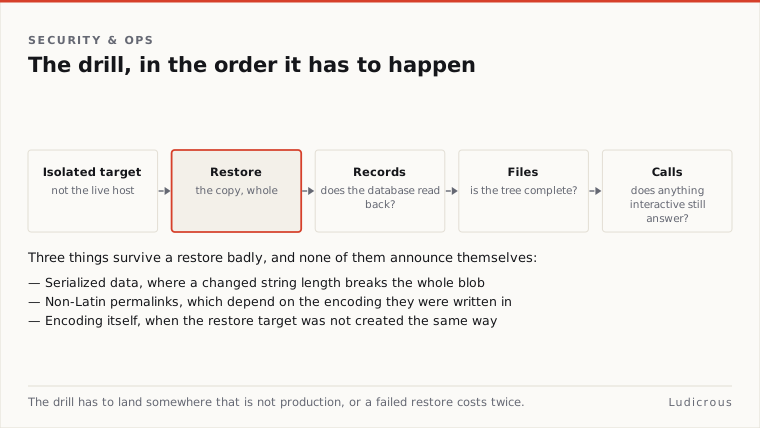
Operating in a separate space protects the live site from accidental overwrites. ThriveWP stresses that testing must use a recent backup restored into a private, detached environment.
Timing the exercise provides operational baseline numbers. Administrators should measure recovery time from the moment the archive file is pulled until the test site responds to requests. Tracking this duration shows how long an organization would remain offline during an actual emergency.
Verifying Database Records, Filesystems, and Interactive Calls
Loading the front page of a restored site is not proof of a complete recovery. TheOneWP outlines a recovery checklist that evaluates database inclusion and uploads inclusion as separate items. A database dump can succeed while leaving behind thousands of attached images, or an uploads folder can copy over cleanly while missing tables.
ThriveWP notes that a successful recovery must be evaluated against the operational functions an organization depends on to conduct its daily work. The restore test must extend past the public homepage.
A comprehensive drill requires three concrete technical verifications:
- Testing AJAX functionality across administrative panels and public forms.
- Confirming active database writes by publishing new entries and updating option values.
- Checking filesystem writes by uploading fresh media assets directly to the storage disk.
These checks confirm that write permissions, database user privileges, and asynchronous endpoints are functioning.
BackWPup documentation from August 2026 notes that its core software backs up both the database and system files, storing those archives locally on the server or transmitting them to offsite cloud storage. Because data and media travel through separate pipelines, both assets require distinct inspection once extracted.
Serialized Data, Non-Latin Permalinks, and Encoding Pitfalls
The internal structure of WordPress stores complex configuration arrays as serialized strings. In these strings, the exact character count of an option name or value is hardcoded into the database. If a database search-and-replace operation changes an internal domain name or path without adjusting the length markers, the PHP serialization breaks.
ServMask migration troubleshooting documentation published in April 2026 warns that raw SQL queries must never be used for URL replacement. Instead, URL changes must rely on serialization-aware tools such as WP-CLI's search-replace command, which recalculates byte counts across serialized rows during migrations.
Specific content types are unusually vulnerable during extraction and re-import:
- Page-builder data and non-Latin paths: BackupEase plugin documentation from September 2026 warns that backup operations can disrupt permalinks that use non-Latin characters. The same documentation warns that page-builder content saved as serialized data, including Elementor layouts, is prone to damage during archive creation and restoration.
- Special characters and tokens: Documentation for Swish Migrate and Backup from May 2026 notes that literal percent signs in database content were previously converted into placeholder tokens during backup generation. This behavior corrupted serialized settings on restore and caused raw placeholder tokens to leak directly into published post content.
- Theme options and widgets: BackReload plugin documentation from September 2026 outlines a specialized percent-sign repair routine designed to recover serialized WordPress options, specifically targeting damaged theme settings, widgets, and plugin option blocks.
- Character sets and 4-byte characters: BackWPup documentation describes specific fixes required to support emojis and other 4-byte characters within database dumps. The plugin's documentation also notes that a default character set can be fetched from alternative database credentials when connecting to external or staging databases.
These structural errors rarely appear on static text posts. They surface when an administrator opens a page-builder canvas, adjusts a widget area, or loads content containing international alphabets and emoji sets.
Platform Restore Flows and Operational Verification
Major WordPress hosting providers build dedicated interfaces to handle these restore routines. WP Engine support documentation from June 2026 outlines a standard recovery pathway navigating from the central Sites page, into Backups, and through to the Restore prompt.
WordPress.com support documentation published in December 2019 describes a global "Restore now" button that can roll back an entire website. The platform documentation notes that administrators can also select specific components or distinct files to restore independently.
WordPress.com Component RestoreA backup plan is only as reliable as its last verified deployment in an isolated environment. Routine testing in staging containers, validation of serialized database strings, separate checks for media folders, and write-level tests establish whether an archive will actually function during a production outage.