 Tooling
Tooling
Git Hooks That Catch the Mistakes You Keep Making
A single malformed PHP file committed to a repository breaks continuous integration pipelines, blocks team branches, and burns developer time.
Last reviewed
Git halts commit creation the instant a pre-commit script issues a non-zero exit code. That single exit code prevents the commit object from entering the local history, sparing developers the downstream embarrassment of pushing syntax errors.

Using a local git pre-commit hook php lint check intercepts broken syntax right at the terminal prompt. The mechanism is straightforward, but its operational realities demand a clear understanding of what Git validates, what PHP reports, and where client-side tooling reaches its natural boundaries.
Catching Syntax Errors Before the Commit Object Exists
Git structures its commit workflow around a sequence of discrete hook invocations. When a developer executes git commit, Git immediately looks for an executable file named pre-commit inside its active hooks directory. This execution occurs before Git gathers the proposed commit log message from the author and before the commit object is written to disk.
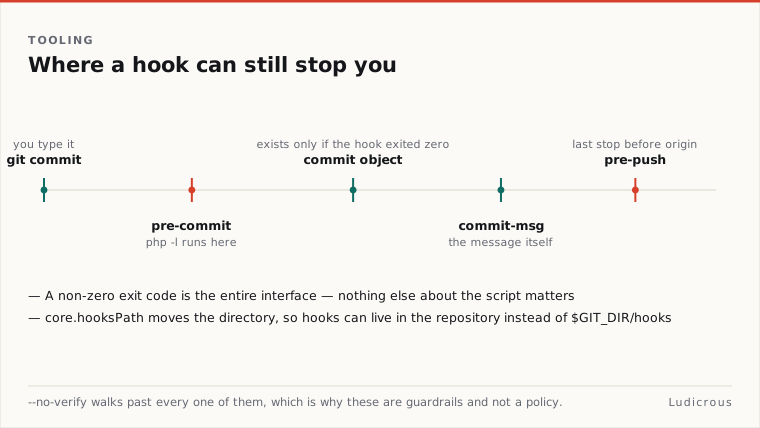
If the script completes with a status of zero, Git proceeds to open the commit message editor or accept the provided message flag. If the script exits with any non-zero value, Git aborts the operation immediately. No commit is recorded, no log message is requested, and the index remains untouched.
This order of execution makes pre-commit the earliest programmatic filter in the development loop. Because the hook runs prior to message collection, it spares the author from writing an explanation for a commit that cannot pass basic structural checks. The failure happens instantly in the local terminal.
#!/bin/sh
# Example pre-commit script aborting on error
Php -l path/to/file.php
If [ $? -ne 0 ]; then
 exit 1
Fi
The consequence of this design is speed. Developers receive feedback within milliseconds of typing their command. The feedback loop stays confined to the machine where the code was written, long before any remote network call takes place.
Executing PHP Syntax Checks on Targeted Files
PHP includes a built-in syntax evaluation engine accessible directly from the command line. Passing the -l or --syntax-check option instructs the PHP binary to parse the targeted file for syntax validity without executing any of the code contained within it.
This separation of linting from execution prevents side effects. Configuration routines, database connections, class initializations, and global script declarations remain dormant while the parser reads the tokens. When PHP encounters valid syntax, it writes No syntax errors detected in <filename> to standard output and exits with a status code of zero.
When the parser encounters broken code, it produces an explicit message:
Errors parsing path/to/file.phpAlong with that error line, PHP returns a non-zero exit status to the calling shell. If a list of multiple filenames is provided directly to php -l, the binary evaluates each specified file in sequence.
Php -l index.php app/Kernel.php routes/web.phpA common friction point in this process involves file targeting. A developer often stages a subset of changes while leaving other modified files in the working directory. The PHP binary inspects whatever file path it receives on the filesystem. The PHP manual confirms that php -l expects explicit file paths, yet the Git manual does not detail an internal method for reading file contents directly out of the Git index staging area rather than the working tree.
When a hook passes a working tree filename to php -l, the linter evaluates the file as it currently sits on disk. If an author stages a broken file, fixes the error in the editor without staging the fix, and runs git commit, the linter passes the working tree file, but Git commits the broken staged snapshot. Connecting the index snapshot directly to PHP linting remains a distinct scripting task that requires careful handling in custom hook code.
Redirecting Hook Paths with Git Configuration
By default, Git stores and discovers hook scripts in the $GIT_DIR/hooks directory of every clone. Because $GIT_DIR resolves to the hidden .git folder inside a standard repository, these hook scripts exist outside the version-controlled working tree.
Git provides a specific configuration variable to override this location: core.hooksPath. Setting this variable redirects Git to look for all hook scripts in a designated directory path instead of the default $GIT_DIR/hooks location.
Git config core.hooksPath.githooksOnce this configuration entry is set, Git searches the specified directory whenever git commit, git push, or other hook-enabled operations execute. Teams frequently use this setting to store hook scripts inside a versioned repository directory, allowing contributors to activate the same check scripts across their local checkouts.
The official Git documentation defines the core.hooksPath configuration knob and its path resolution behavior. However, the documentation stops short of describing an automatic repository-sharing mechanism. Setting core.hooksPath is a local configuration action on the client machine; Git does not automatically reconfigure a user's local settings simply because a new folder appears in a cloned working tree.
Expanding Checks Across Commit Messages and Push Events
A linting strategy often extends beyond the initial pre-commit stage into subsequent steps of the authoring workflow. Git provides complementary hooks designed for distinct phases of the local lifecycle.
The commit-msg hook is invoked by git commit after the author has supplied a commit log message. It receives a single parameter: the path to the file containing the proposed commit log text. Exiting non-zero from commit-msg aborts the commit before it is finalised, preventing commits that violate required formatting rules or missing ticket identifiers.
For broader checks, Git provides the pre-push hook. This hook is called during the execution of git push and can stop the outbound transfer of refs before any data reaches the remote server. Git passes two specific parameters to the pre-push script:
- The name of the destination remote (such as
origin). - The location or URL of the destination remote.
Git documentation also explicitly details running a single shared command at both pre-commit and pre-push by configuring a hook event list. This capability allows developers to wire one verification script into multiple lifecycle points without duplicating logic. Slower operations that take several seconds can be allocated to pre-push, while instant operations like php -l remain in pre-commit.
# Example check within pre-push
Remote_name="$1"
Remote_url="$2"
Echo "Pushing to ${remote_name} at ${remote_url}"
Local Guardrails and the Bypass Flag
Local hooks provide immediate assistance to the author, but they do not establish a rigid enforcement boundary. Git explicitly documents that both pre-commit and commit-msg can be completely bypassed by appending the --no-verify flag to the commit command.
Git commit -m "WIP emergency patch" --no-verifyWhen --no-verify is passed, Git ignores the pre-commit and commit-msg scripts entirely, creating the commit object regardless of syntax validity or message contents. While pre-push operates as a subsequent barrier before changes leave the local machine, local client configurations remain entirely under the control of the individual developer.
Git's published documentation defines these client-side hooks as local conveniences rather than server-side enforcement gates, leaving open the question of how individual teams choose to back up local linting with centralized validation on their hosting infrastructure.