WordPress
A Minimal WordPress Plugin That Is Actually Correct
Building a standalone WordPress plugin requires far fewer lines of code than most developers assume.
Last reviewed
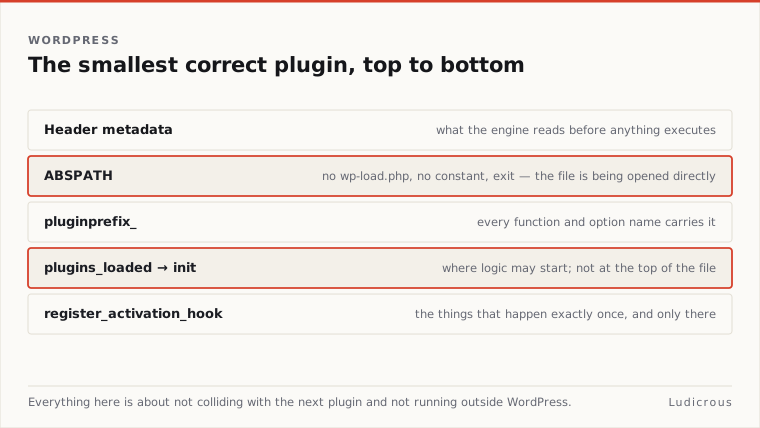
The smallest valid extension is not defined by sheer volume, but by four specific operational rules: a properly formatted header comment, an execution guard against direct file access, distinct naming conventions to prevent collision, and execution tied to the core lifecycle.
Developers who migrate code out of a theme file into an independent structure avoid theme-bound execution. When written correctly, a single file inside the plugins directory runs cleanly without breaking on updates or halting site execution.
Header Metadata and What the Engine Actually Requires
The foundation of any plugin file is a specially formatted PHP block comment placed at the very top of the script. WordPress scans this block to register the extension inside the administration interface.
According to the WordPress Developer Resources header requirements documentation published in September 2014, the only mandatory field inside this block is the plugin name:
<?php
/**
 * Plugin Name: Minimal Example
 */
Without that single line, the WordPress core parser ignores the file completely. The engine also recognizes several optional fields within that same block comment. These include Description, Version, Requires at least, Requires PHP, Author, License, Text Domain, Domain Path, and Requires Plugins.
Each recognized entry serves a concrete administrative purpose. The Description field provides the summary text visible to administrators under the Plugins screen in the WordPress dashboard. Documentation specifies that this description should remain under 140 characters to fit the interface layout cleanly.
The Version field marks the release state of the codebase, using standard release strings such as 1.0 or 1.0.3. While adding every supported metadata line is common practice in commercial distribution, a minimal WordPress plugin structure requires only the name line to be functional and recognized by core loaders.
<?php
/**
 * Plugin Name: Minimal Example
 * Description: A compact, valid WordPress plugin structure.
 * Version: 1.0.0
 * Author: Site Developer
 * License: GPL-2.0-or-later
 */
Why the First Line Blocks Direct Access
Immediately following the opening docblock, standard WordPress development rules require an execution check. The standard guard takes the form of a single conditional statement:
If (! defined( 'ABSPATH' ) ) {
 exit;
}
Learn WordPress guidance updated in March 2024 lists this exact line as a standard requirement. The constant ABSPATH is defined within core files when WordPress boots normally through an incoming request to index.php or wp-load.php.
If a web visitor or automated scanner attempts to query the plugin PHP file directly through its public server URL, the ABSPATH constant will not exist in memory. The conditional evaluates to true, and PHP halts execution immediately with exit.
Halting direct calls stops the script from running in isolation from the broader WordPress environment. Without core initialization, functions or global variables referenced later in the file would trigger fatal errors on the server. Including the check ensures that code only evaluates when the entire application stack is loaded and available.
How to Keep the Smallest Plugin From Colliding
Because PHP shares a single global namespace across the runtime unless explicitly partitioned, identical function names create fatal errors. Two plugins defining the same helper function will crash the environment when both run simultaneously.
The WordPress Plugin Handbook demonstrates collision prevention by prepending a unique prefix to every declared function and hook callback. In its activation examples, the documentation uses pluginprefix_ as the placeholder:
Function pluginprefix_custom_action {
 // Runtime logic executes here.
}
Developers replace pluginprefix_ with an identifier unique to their specific project, such as an abbreviation of the plugin title. When defining functions, action hooks, or filter callbacks, using this uniform string prefix shields the global scope.
The core engine does not mandate an elaborate architectural wrapper for basic tasks. Prefixing procedural functions provides sufficient isolation for small utility scripts, satisfying the engine's requirement for conflict-free code execution.
Where Plugin Logic Should Start
Running custom code too early in the WordPress boot process causes silent failures or fatal errors if that code relies on functions defined by core or companion plugins. The initial PHP file evaluates as soon as the active plugin list is parsed, well before the rest of the environment finishes loading.
The action hook plugins_loaded establishes the baseline execution point for runtime logic. WordPress Developer Resources hook documentation notes that plugins_loaded fires early in the execution sequence:
Function pluginprefix_init {
 // Core and active plugins are fully loaded.
}
Add_action( 'plugins_loaded', 'pluginprefix_init' );
Lifecycle data shows that plugins_loaded runs before setup_theme, after_setup_theme, init, and wp_loaded. Because it executes before theme registration hooks, code mounted here runs as soon as all active extensions are present in memory.
Waiting for plugins_loaded guarantees that all pluggable functions, constants, and third-party classes exist before the plugin attempts to call them. Placing raw operational code directly in the global scope of the file instead of inside a hook callback bypasses this safety boundary.
What Belongs in Activation Only
Certain configuration actions should run only once when an administrator turns the plugin on, rather than on every single page load. Setting up custom options, populating database defaults, or checking environment compatibility belong exclusively to the activation phase.
WordPress handles this process via register_activation_hook:
Register_activation_hook( __FILE__, 'pluginprefix_activate' );Function pluginprefix_activate { // One-time setup tasks run here. } ```
This registration comes with strict placement rules. According to official developer reference documentation, register_activation_hook must be called in the main plugin file's global scope, passing __FILE__ along with the callback function name.
The documentation explicitly notes that register_activation_hook will not work if placed inside a function hooked to plugins_loaded, init, or any subsequent action. Activation hooks run before the plugin is loaded or activated into the general runtime. Registering the hook inside an operational runtime hook causes WordPress to miss the registration window entirely during the activation redirect.
Why Not Put It in a Theme
Placing site-wide logic in a theme's functions.php file is a frequent structural error. Theme lifecycle data published in site development resources details that functions.php is evaluated much later in the request, right before the after_setup_theme action hook.
Because functions.php belongs to the presentation layer, the code within it is theme-bound. When an administrator switches to a new design, the existing functions.php file stops executing entirely.
Moving standalone functionality into an independent plugin file under wp-content/plugins/ anchors that code to the platform rather than the presentation template. The execution flow stays uniform:
- WordPress loads the file header and confirms the active plugin status.
- The
ABSPATHcheck protects against raw web access. - Global calls register activation callbacks using
__FILE__. - Runtime callbacks attach to
plugins_loadedto begin regular operations after all plugins register.
Separating persistent tools from the active theme ensures the underlying logic remains intact across design changes, maintaining a stable and correct execution footprint throughout the platform lifecycle.